Important Information
You are visiting the international Vantage Markets website, distinct from the website operated by Vantage Global Prime LLP
( www.vantagemarkets.co.uk ) which is regulated by the Financial Conduct Authority ("FCA").
This website is managed by Vantage Markets' international entities, and it's important to emphasise that they are not subject to regulation by the FCA in the UK. Therefore, you must understand that you will not have the FCA’s protection when investing through this website – for example:
- You will not be guaranteed Negative Balance Protection
- You will not be protected by FCA’s leverage restrictions
- You will not have the right to settle disputes via the Financial Ombudsman Service (FOS)
- You will not be protected by Financial Services Compensation Scheme (FSCS)
- Any monies deposited will not be afforded the protection required under the FCA Client Assets Sourcebook. The level of protection for your funds will be determined by the regulations of the relevant local regulator.
If you would like to proceed and visit this website, you acknowledge and confirm the following:
- 1.The website is owned by Vantage Markets' international entities and not by Vantage Global Prime LLP, which is regulated by the FCA.
- 2.Vantage Global Limited, or any of the Vantage Markets international entities, are neither based in the UK nor licensed by the FCA.
- 3.You are accessing the website at your own initiative and have not been solicited by Vantage Global Limited in any way.
- 4.Investing through this website does not grant you the protections provided by the FCA.
- 5.Should you choose to invest through this website or with any of the international Vantage Markets entities, you will be subject to the rules and regulations of the relevant international regulatory authorities, not the FCA.
Vantage wants to make it clear that we are duly licensed and authorised to offer the services and financial derivative products listed on our website. Individuals accessing this website and registering a trading account do so entirely of their own volition and without prior solicitation.
By confirming your decision to proceed with entering the website, you hereby affirm that this decision was solely initiated by you, and no solicitation has been made by any Vantage entity.
I confirm my intention to proceed and enter this website Please direct me to the website operated by Vantage Global Prime LLP regulated by the FCA in the United KingdomImportant Information
By providing your email and proceeding to create an account on this website, you acknowledge that you will be opening an account with Vantage Global Limited, regulated by the Vanuatu Financial Services Commission (VFSC), and not the UK Financial Conduct Authority (FCA).
-
Please enter a valid email address
-
Please tick the checkbox to proceed
-
Please tick the checkbox to proceed
Please tick all to proceed

Access Restricted
Your access to this website is restricted.
Our website and services are not available to, and are not intended for, individuals who are citizens or residents of the United States, or entities incorporated in or conducting business within the United States.
If this does not apply to you and you believe you have received this message in error, please contact us at support@vantagemarkets.com for further assistance.
If you fall into any of the above categories, please exit the site.
Important Information
Thank you for visiting the Vantage Markets website. Please note that this website is intended for individuals residing in jurisdictions where accessing it is permitted by Vantage and its affiliated entities do not operate in your home jurisdiction.
By clicking 'I CONFIRM MY INTENTION TO PROCEED AND ENTER THIS WEBSITE', you confirm that you are entering this website solely based on your initiative and not as a result of any specific marketing outreach. You wish to obtain information from this website based on reverse solicitation principles, in accordance with the applicable laws of your home jurisdiction.
I CONFIRM MY INTENTION TO PROCEED AND ENTER THIS WEBSITE
-

-


Download App
-


-

-

-
Search query too short. Please enter a full word or phrase.
-

Keywords
Popular Search








Language


Best Trading Platform for Beginners: 8 CFD Brokers Compared

Vantage Editorial Team >
28 October 2026 | Academy | 35 min read
Vantage Editorial Team >
Vantage is a global, multi-asset broker with a team of experienced in-house writers, analysts, and market professionals. Together, they craft trusted, educational, and market-driven content tailored for traders at every stage—from beginner to pro.

Disclaimer: This article is for informational purposes only and reflects information available at the time of publication. Broker offerings, fees, regulations, platform features, and trading conditions may change over time. Readers should conduct their own research before making any trading or investment decisions.
Search for a beginner trading platform and you will find a dozen ranked lists, most of them naming a different winner. What almost none of them show is how the ranking was produced — which criteria carried weight, what evidence sat behind each claim, and what was left out entirely.
That matters more than the ordering does. A list built around platform features will favour different providers to one built around what keeps a first account intact through its opening months, and neither list is wrong so much as differently aimed.
So this comparison publishes its method before its results: eight Contract for Difference (CFD) providers, assessed on demo access, structured education, cost transparency, entry cost and the retail protections that apply to a new account automatically.
Key Points
- A beginner platform ranking is only as useful as the criteria behind it, so the full selection method is set out here and can be re-applied to any provider this comparison does not cover.
- Most beginners place their first trade on a phone, so what a provider’s mobile app shows before an order is confirmed matters more than the desktop feature list it is usually compared on.
- Entry deposits across the eight providers compared here range from around $5 to roughly $200, though the deposit a platform accepts and the balance a strategy needs are different numbers.
What Makes a Trading Platform Suitable for a Beginner
A trading platform is the software you place and manage orders in; a broker is the regulated firm that holds your money and executes those orders. Most first-time comparisons look hard at the software and barely at the firm. That is the wrong way round.
The best trading platform for a beginner is the one that pairs an unlimited demo account with structured education, costs you can calculate before you trade, and an app that still shows you what matters on a small screen — not the one with the longest feature list.
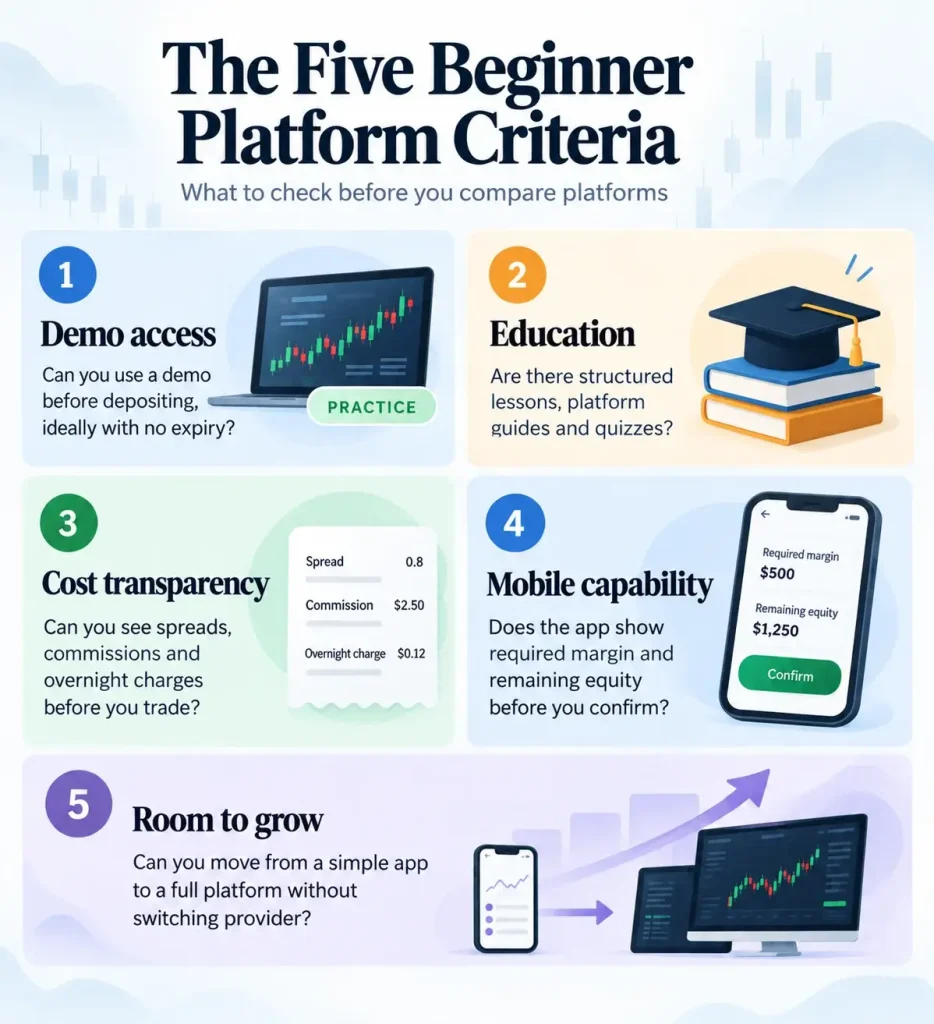
Five criteria separate a platform a new trader can learn on from one they will simply be exposed by.
- Demo access without a deposit: A demo account should be available before you fund anything, and ideally without an expiry date. Time-limited demos push you into a live account on the broker’s schedule rather than yours.
- Education built into the product: A blog is not a curriculum. Look for sequenced lessons, platform walkthroughs and quizzes rather than a feed of market commentary.
- Costs you can work out in advance: A suitable platform makes the spread, any commission per lot, and the overnight financing charge visible before you open a position rather than after it.
- An app that does not hide the important parts: Most first trades are placed on a phone. The margin a position needs and the equity left in the account should both be visible before you confirm an order, not a screen away.
- Room to grow without switching: A platform you outgrow in six months costs you a migration. Providers offering both a simplified app and a full desktop terminal let the same account scale with you.
Two of those criteria are worth understanding before you compare anything. CFDs are derivatives, so how CFD trading differs from spot forex affects what you are actually buying, and a provider’s execution model — whether it routes to liquidity providers as an ECN broker or prices internally — shapes the cost you pay on every trade.
How These Eight Platforms Were Selected
A ranking is worth only as much as the method behind it, so the method comes first. This comparison is a documentary review: every statement in it is drawn from information each provider publishes about its own accounts, platforms and terms. It did not involve opening live accounts, placing trades or measuring execution, and nothing here should be read as a performance test.
The five criteria in the previous section were not weighted equally. Three carry most of the weight, because they bear on the months when a new account is at its most fragile — when position sizing is still guesswork and costs have not yet become intuitive.
| Criterion | Weight | Evidence used | Why it carries this weight |
| Mobile app capability | High | Published app feature lists and the order-entry screens each provider documents | Most first trades are placed on a phone, so an app that hides margin and equity detail hides the part that matters most |
| Cost transparency | High | Published spread, commission and overnight financing schedules | Costs compound quietly, and a beginner rarely notices them until they have already accumulated |
| Demo access | High | Published demo terms, including whether funding is required and whether the account expires | Mechanical errors are cheapest to make in simulation, and an expiring demo withdraws that option early |
| Structured education | Medium | Published course, lesson and webinar programmes | Sequenced learning helps, though no curriculum substitutes for time spent in a demo |
| Platform range and entry cost | Lower | Published platform lists and minimum opening deposits | Both are easy to compare and easy to overweight, and neither predicts how an account fares |
What This Comparison Deliberately Left Out
Four things that appear in most platform rankings were excluded, each for a stated reason.
- Promotional terms: Deposit bonuses, rebates and trading credits were left out, because an incentive changes the cost of an account without changing how it behaves.
- Award badges: Industry awards were excluded, as entry criteria and entrant pools differ between schemes and the results are not comparable across them.
- Instrument counts: A provider listing 10,000 instruments and one listing 1,000 look very different on paper and nearly identical to someone trading two currency pairs.
- Live cost benchmarking: Measuring real spreads and execution sat outside the scope of a documentary review, so published schedules were used instead — and those are indicative rather than guaranteed.
Applying the Same Method to a Provider Not Listed Here
Eight providers is a shortlist, not a survey, and a provider absent from it is not thereby unsuitable. The same five questions can be put to any CFD provider in roughly ten minutes, and all five are answerable from the provider’s own site without opening an account.
- Which regulated entity would hold your account, and which protections apply to that entity?
- Is the demo free to open, usable without funding, and open-ended — or does it expire?
- Are spread, commission and overnight financing published as schedules you can read before depositing anything?
- Is the education a sequence with a beginning and an end, or a rolling feed of market commentary?
- What is the smallest position size available, and does it leave usable room on the balance you actually intend to fund?
8 Best Trading Platforms for Beginners Compared
The eight providers below were compared on the criteria set out above rather than on overall size or brand recognition: which platforms each offers, whether a demo account is available without funding, how education is structured, and the deposit needed to open a live account, weighted as set out above.
Figures reflect each provider’s publicly published account and platform information as at August 2026, and terms vary between a provider’s regulated entities — confirm the current position with the provider before opening an account.
| Provider | Platforms offered | Demo account | Education format | Minimum deposit |
| Vantage | MT4, MT5, TradingView, Web Trading, Vantage App | Virtual funds, no deposit required | Academy articles, courses and platform guides | From around $50 |
| IG | Proprietary web platform, MT4, ProRealTime, L2 Dealer | Yes, with virtual funds | IG Academy structured courses | No set minimum |
| CMC Markets | Next Generation, MT4, TradingView | Yes, with virtual funds | Trading Academy, webinars and platform guides | No set minimum |
| XTB | xStation 5 (web, desktop, mobile) | Yes, with virtual funds | 200+ Knowledge Base lessons, many with quizzes | Varies by entity |
| Pepperstone | MT4, MT5, cTrader, TradingView | Yes; some entities apply an expiry | Articles, video tutorials and live webinars | No set minimum |
| IC Markets | MT4, MT5, cTrader, TradingView | Yes, with virtual funds | Articles and platform tutorials | From around $200 |
| XM | MT4, MT5 | Yes, with virtual funds | Live webinars and seminars in multiple languages | From around $5 |
| Exness | Exness Terminal, MT4, MT5 | Yes, with virtual funds | Platform tutorials and market analysis | From around $10 |
| Provider | How a trade is priced | Mobile app |
| Vantage | Spread-only on Standard STP accounts, or a raw spread plus a commission per lot on Raw ECN accounts | Vantage App, a proprietary app, alongside the MT4 and MT5 mobile apps |
| IG | Spread-based on most CFDs, with a direct market access account adding a commission, and share CFDs priced on commission | A proprietary IG app covering the full CFD range, alongside MT4 mobile |
| CMC Markets | Spread-based across most CFD markets, with a commission-based forex plan available and share CFD commissions varying by exchange | A proprietary app carrying the Next Generation platform to mobile |
| XTB | Spread-based on forex, index and commodity CFDs, with a percentage commission applied to share CFDs | xStation mobile, the same proprietary platform as web and desktop |
| Pepperstone | Spread-only on Standard accounts, or a raw spread plus a commission per lot on Razor accounts | A proprietary app alongside the MT4, MT5 and cTrader mobile apps |
| IC Markets | Spread-only on Standard accounts, or a near-zero raw spread plus a commission per lot on Raw Spread accounts | A proprietary app alongside the MT4, MT5 and cTrader mobile apps |
| XM | Spread-only on Standard and Micro accounts, or a zero-spread account that applies a commission per lot instead | A proprietary app alongside the MT4 and MT5 mobile apps |
| Exness | Spread-only on Standard accounts, with professional account types quoting tighter spreads against a commission per lot | Exness Trade, a proprietary app, alongside the MT4 and MT5 mobile apps |
Two things stand out from that second table. Almost every provider runs a spread-only account alongside a commission-based one, which matters more than it first appears: the cheaper option depends on how often you trade, and the commission account is rarely the cheaper choice at low volume. The distinction broadly follows the difference between ECN and STP execution models. And all eight now offer a proprietary app rather than leaving you to MetaTrader’s, which is a recent change and a useful one, because a provider designing its own app decides what a beginner sees before confirming an order.
Every instrument named across these platforms is traded as a CFD, which means you speculate on price movement without owning the underlying asset. Where a provider offers both MetaTrader generations, it is worth knowing how MT4 and MT5 differ before you pick one, because migrating an established chart layout and indicator set later is tedious.
The eight below are ordered by nothing in particular — each heading names what that provider does distinctively against the criteria above, and the sequence is not a ranking.
Vantage: Best for Multi-Platform Access on One Account
Vantage is a multi-asset CFD provider founded in 2009, offering access to over 1,000 CFD instruments spanning forex, indices, commodities, shares, ETFs and bonds. Five platforms run under the same account: MT4, MT5, TradingView, a browser-based Web Trading platform, and the Vantage App.
For someone still working out which interface suits them, that range removes the need to choose before they have anything to base the choice on — one login opens both MetaTrader’s order ticket and TradingView’s charting.
The demo account carries virtual funds, requires no deposit and does not expire, so it can keep running alongside a live account. Services are provided through independently operated entities regulated in several jurisdictions, and both product availability and the account terms that apply depend on which entity holds the account.
- Cost structure: Standard STP accounts price through the spread with no separate commission, while Raw ECN accounts quote a tighter raw spread and charge a commission per lot instead.
- Mobile app: The Vantage App is a proprietary mobile platform, and the MT4 and MT5 apps are available alongside it, so a position opened on desktop can be managed from either.
- Main consideration: Five platforms is more choice than a first account needs, and the account types differ in cost structure, so the schedules are worth reading before opening one.
- May suit: Traders who want to test more than one platform before settling on it, and who value a demo that does not expire.
IG: Best for Structured Course-Based Learning
IG is a publicly listed provider founded in 1974, offering CFDs across a broad instrument range through its own web platform alongside MT4, ProRealTime and L2 Dealer.
IG Academy organises education as courses with a defined beginning and end rather than a rolling feed of commentary, which suits a beginner who wants a syllabus to work through. The demo carries virtual funds and no time limit, so it can be kept open for testing after a live account exists.
- Cost structure: Most CFDs price through the spread. A direct market access account quotes raw spreads against a commission, and share CFDs are priced on commission rather than spread.
- Mobile app: A proprietary app carries the full CFD range to mobile, with MT4’s own app available for those who prefer it.
- Main consideration: Pricing varies by instrument and service rather than following a single flat schedule, so establishing the cost of a given trade takes more reading.
- May suit: Beginners who would rather complete structured lessons before funding anything.
CMC Markets: Best for Breadth of Forex CFD Markets
CMC Markets is a London-listed provider founded in 1989, built around its proprietary Next Generation platform, with MT4 and TradingView also available.
Its forex CFD menu is among the widest in this comparison, with a large number of pairs quoted in both directions. Trading Academy material, webinars and platform guides sit inside the same account, and the guides cover the Next Generation interface in some detail.
- Cost structure: Pricing is spread-based across most CFD markets, with a commission-based forex plan available and share CFD commissions differing by exchange.
- Mobile app: A proprietary app brings the Next Generation platform to mobile, keeping charting and order entry consistent with the desktop version.
- Main consideration: Next Generation carries a lot of functionality, and locating the settings that matter takes time in the first few sessions.
- May suit: Beginners who expect to concentrate on forex CFDs and want depth in that one market rather than range across many.
XTB: Best for Guided Lessons With Progress Checks
XTB is a publicly listed provider whose offering centres on xStation 5, available across web, desktop and mobile.
Its Knowledge Base runs to more than 200 lessons, sortable by topic and by experience level, with quizzes attached to many of them — a format that tells a beginner whether the material landed rather than only that it was read. MetaTrader 4 is no longer offered on newly opened accounts, so xStation is the platform.
- Cost structure: Forex, index and commodity CFDs price through the spread, while share CFDs carry a percentage commission. Terms differ between entities.
- Mobile app: xStation runs as the same proprietary platform across web, desktop and mobile, so nothing has to be relearned when switching screens.
- Main consideration: Entry deposit requirements differ between XTB’s regulated entities, so the figure that applies depends on which one would hold the account.
- May suit: Beginners who learn better against checkpoints than from reading alone.
Pepperstone: Best for cTrader Access Alongside MetaTrader

Pepperstone is a CFD provider founded in 2010, offering MT4, MT5, cTrader and TradingView alongside a proprietary mobile app.
cTrader is the distinguishing item here, using a different order-entry model to MetaTrader’s — a difference some traders come to prefer once they have formed a view on how they place orders. Education spans written guides, video tutorials and live webinars.
- Cost structure: Standard accounts price through the spread with no commission; Razor accounts quote raw spreads and charge a commission per lot.
- Mobile app: A proprietary app sits alongside the MT4, MT5 and cTrader mobile apps, which means the mobile experience depends on which terminal you settled on.
- Main consideration: Demo accounts expire on some entities unless a funded live account exists, so the practice window is not open-ended everywhere.
- May suit: Beginners who expect to become active quickly and want to compare order-entry models early.
IC Markets: Best for Starting With a Defined Balance
IC Markets is a CFD provider founded in 2007, supporting MT4, MT5, cTrader and TradingView across a notably wide instrument list.
Its published entry deposit is the highest of the eight at around $200, which positions the account for someone arriving with a starting balance already decided rather than testing the water. Education is weighted towards platform tutorials and written guides.
- Cost structure: Standard accounts price through the spread; Raw Spread accounts quote near-zero spreads against a commission per lot.
- Mobile app: A proprietary app is available alongside the MT4, MT5 and cTrader mobile apps, mirroring the desktop platform choice.
- Main consideration: The higher opening deposit makes the first step more of a commitment and less of a trial.
- May suit: Traders who have already practised in a demo elsewhere and know the balance they intend to fund.
XM: Best for the Smallest Opening Deposit
XM is a CFD provider founded in 2009, running MT4 and MT5 with accounts that open from around $5.
Micro-lot sizing lets a small balance take positions proportionate to it, which is the part that makes a low deposit useful rather than merely low. Education is delivered largely through live webinars and seminars run in multiple languages.
- Cost structure: Standard and Micro accounts price through the spread with no commission, while a zero-spread account applies a commission per lot instead.
- Mobile app: A proprietary app runs alongside the MT4 and MT5 mobile apps, with the same micro-lot sizing available on the phone.
- Main consideration: A balance of a few dollars leaves very little headroom, and the smallest position size available still has to fit it.
- May suit: Beginners who want the smallest possible first commitment and prefer live teaching to written lessons.
Exness: Best for a Proprietary Terminal at Low Entry Cost
Exness is a CFD provider founded in 2008, offering its own Exness Terminal alongside MT4 and MT5, with accounts opening from around $10.
The proprietary terminal is browser-based and aimed at traders who find MetaTrader’s interface dense on first contact. Several account types sit at different cost structures, and education leans towards platform tutorials and market analysis.
- Cost structure: Standard accounts price through the spread, and the professional account types quote tighter spreads against a commission per lot.
- Mobile app: Exness Trade is a proprietary app, offered alongside the MT4 and MT5 mobile apps, and mirrors the browser-based terminal.
- Main consideration: With several account types available, the cost of a trade depends on which one is opened, so the schedules are worth comparing first.
- May suit: Beginners who want a lighter interface than MetaTrader and a low opening commitment.
Note: A small opening deposit is a genuine advantage only if the position sizing available to you matches it. Funding an account with $10 and then opening a standard lot leaves almost no room between entry and close-out.
How Much Money You Need to Start Trading
The deposit a platform accepts and the balance a strategy needs are two different figures, and conflating them is one of the more common ways a first account ends early.
Available leverage differs by instrument and by provider, with more volatile markets generally offered at lower ratios. Whatever ratio applies, it sets the margin you must post against a position, and how leverage works in practice determines how much of a balance a single adverse move consumes.
Consider a hypothetical position of 0.1 lots on a major currency pair — 10,000 units of the base currency — where the provider applies leverage of 30:1. The margin required is roughly $333, and each pip of movement is worth about $1. A 50-pip move against that position therefore costs around $50, or close to 15% of the margin posted. Three such moves in a week, none of them dramatic by the standards of a normal market, would account for nearly half of it. Leverage magnifies gains and losses in exactly the same proportion.
This example is hypothetical and for illustrative purposes only. It does not reflect actual trading results or client experiences.
The practical implication is about buffer rather than minimums. An account funded close to the margin requirement of its own positions has no room for ordinary volatility, and a margin call or automatic close-out becomes a matter of timing rather than judgement.
Approaches to forex risk management vary, but some traders cap risk at 1% to 2% of account equity per position; on a $500 balance that is $5 to $10, which constrains how far a stop can sit from entry. This is general information only and does not constitute financial advice. Individual circumstances vary.
Why a Demo Account Comes Before a Live One
A demo account is a simulated trading environment funded with virtual money, priced against live or near-live market data. All eight providers compared here offer one, and a demo account generally costs nothing and requires no deposit to open.
What a demo teaches well is mechanics. Order types, position sizing, where the close button is, what happens when a pending order fills at three in the morning — these are things worth getting wrong for free. Placing perhaps fifty simulated trades before funding anything is a low-cost way to find out which parts of the process you do not yet understand.
What a demo does not teach is how you behave with real money at stake, and it rarely reproduces slippage or liquidity gaps faithfully. A strategy that looked steady in simulation can perform differently once execution frictions and your own reactions enter the picture.
Two habits make demo time more useful than idle clicking. Trade the simulated balance you actually intend to fund rather than the $100,000 the platform hands you, since a large virtual balance hides position-sizing errors. And record every trade with the reason for entry and exit — the same discipline behind paper trading on TradingView applies on any platform.
A demo log that shows fifty entries and no stated reason for any of them has taught you very little.
What to Look For in a Mobile Trading App
Most people place their first trade on a phone, and every provider in this comparison now offers an app of its own rather than leaving you to a third-party terminal. That makes the app a real point of comparison rather than an afterthought, because the provider decides what a beginner sees in the seconds before an order is confirmed.
Screen space forces choices. A desktop terminal can show price, margin, equity, open positions and a chart at once; a phone cannot, so something gets moved a tap away. Which things a provider chooses to demote is the useful signal.
| What to check | Why it matters on a small screen |
| Margin shown before confirmation | If the margin a position requires only appears after it opens, you cannot size the trade against your balance at the moment it counts |
| Account equity on the order screen | Equity against used margin is the number that tells you how much room is left; an app that hides it makes over-sizing easy |
| Stop attached at entry | Apps that require a second action to add a stop leave a gap between opening a position and defining what it can cost |
| Position size control | Lot size fields that step in large increments push a small balance towards positions bigger than it should hold |
The fastest way to compare apps is to install two or three and run them in demo mode, which costs nothing and takes an evening. If a provider offers both its own app and the MetaTrader ones, they behave differently enough to be worth trying separately — a beginner’s walkthrough of MetaTrader 4 covers the order ticket that the mobile app inherits, and placing a first trade shows the sequence end to end.
One caution worth carrying into any app. Simplicity and safety are not the same thing: an interface that removes margin figures, position size detail and the stop-loss field from the main screen feels easier to use and tells you less about what a trade can cost.
The app that asks you more questions before confirming is usually the one working in your favour.
Matching a Platform to How You Plan to Trade
The comparison narrows quickly once you know roughly how often you expect to trade and how much time you can give it. A platform that suits someone checking charts twice a day is a poor fit for someone checking twice a month.
| If you expect to | Prioritise | Because |
| Learn slowly before funding anything | An unlimited demo and a sequenced course programme | Time-limited demos and unstructured blogs both push you live before you have a process |
| Trade a handful of major pairs actively | Transparent per-lot costs and platform choice | Frequent trading makes spread and commission the dominant variable in your results |
| Hold positions for days or weeks | Clear overnight financing rates and a wide instrument list | Financing accrues daily, so it outweighs entry cost over longer holding periods |
| Follow other traders while you learn | A provider with an integrated copy trading facility | Bolting a third-party service onto an account adds cost and a second set of terms |
The last row carries a caveat worth stating plainly. Copy trading moves the decision to someone else; it does not remove the risk, and a followed trader’s past results are not a reliable indicator of future outcomes. If that route appeals, a beginner’s guide to copy trading covers how allocation and drawdown settings work before any capital follows.
None of these paths is inherently more suitable than the others. The mismatch to avoid is choosing a platform for a style of trading you do not intend to do, then paying for capability you never use or discovering a limitation halfway through your first month.
Compare the Terms, Not the Interface
Feature lists across the eight providers here converge more than their marketing suggests. Most offer MetaTrader, all offer a demo, most publish some form of education, and opening deposits sit low enough at six of the eight that cost of entry rarely decides anything.
What separates them for a beginner sits further down the page: whether the demo expires, whether the education is sequenced or scattered, whether a trade is priced through the spread or a commission, and how much the mobile app shows you before it lets you confirm.
Those four answers are all publicly available, and they take some research to gather across a shortlist. Start there rather than with the interface. The platform you look at every day matters far less than the terms you agreed to on the day you opened it.
Frequently Asked Questions
What is the best trading platform for beginners?
There is no single answer that holds for every new trader, because the right platform depends on how often you intend to trade and how much time you can give to learning. The platforms that suit beginners most consistently share four traits: a demo account available without a deposit, education organised as a sequence rather than a blog feed, costs you can calculate before opening a position, and retail protections applied automatically by the provider. Of the eight compared here, XTB and IG lean hardest into structured education, while Vantage, Pepperstone and IC Markets each offer several trading platforms under a single account.
What is the best trading app for beginners?
Mobile apps vary more than desktop platforms, because each provider decides how much of the full terminal to expose on a small screen. A beginner-suitable app generally shows the margin required before you confirm an order, allows a stop-loss to be attached at the point of entry rather than afterwards, and displays account equity against used margin on the main screen. Testing two or three apps in demo mode costs nothing and reveals these differences faster than reading comparisons. Apps that simplify by hiding margin and risk detail make trading feel easier without making it safer.
How much money do you need to start trading as a beginner?
Opening deposits across the providers compared here range from around $5 to roughly $200, but the minimum a platform accepts is not the balance a strategy needs. The relevant question is how much buffer sits between your account equity and the margin your positions require, since a thin buffer leaves ordinary volatility able to trigger a close-out. Some traders limit risk to 1% to 2% of equity per position, which on a small balance restricts how far a stop can sit from entry. This is general information only and does not constitute financial advice.
Can beginners trade without using a demo account first?
Nothing prevents it, and many people do. The trade-off is that every mechanical mistake — a mistyped lot size, a stop attached to the wrong side, a pending order left open over a weekend — then costs real money rather than virtual money. A demo will not prepare you for how you react to a live loss, and it rarely reproduces slippage accurately, so it is a partial rehearsal rather than a complete one. Its value lies in separating the learnable mechanics from the harder behavioural part.
Do you need to download software, or can you trade in a browser?
Both options exist at every provider compared here. Browser-based platforms run without installing anything and suit a beginner who wants to look around before committing, while desktop terminals such as MetaTrader generally offer deeper charting, more indicators and the ability to run automated strategies. Mobile apps sit between the two. Most traders end up using more than one: a desktop or browser platform for analysis and an app for managing positions away from a screen. Since the same account usually opens all three, this is rarely a decision you have to make up front.
Are online trading platforms safe for beginners?
Safety in this context has two separate meanings. The first is whether the provider is regulated, holds client funds in segregated accounts and applies negative balance protection — all of which you can verify before depositing anything. The second is whether the product itself carries risk, and CFDs plainly do: they are leveraged instruments, so a position can move against a balance far faster than an unleveraged one would. A well-regulated platform reduces counterparty risk. It does not reduce market risk, and no platform can.
RISK WARNING: CFDs are complex financial instruments and carry a high risk of losing money rapidly due to leverage. You should ensure you fully understand the risks involved and carefully consider whether you can afford to take the high risk of losing your money before trading.
Disclaimer: The information is provided for educational purposes only and doesn’t take into account your personal objectives, financial circumstances, or needs. It does not constitute investment advice. We encourage you to seek independent advice if necessary. The information has not been prepared in accordance with legal requirements designed to promote the independence of investment research. No representation or warranty is given as to the accuracy or completeness of any information contained within. This material may contain historical or past performance figures and should not be relied on. Furthermore estimates, forward-looking statements, and forecasts cannot be guaranteed. The information on this site and the products and services offered are not intended for distribution to any person in any country or jurisdiction where such distribution or use would be contrary to local law or regulation.
Key Points In This Article

Latest Academy Articles


Market News Tags
- # Asian Market News Today
- # Crude Oil News Today
- # Earnings News Today
- # Economic News Today
- # Featured News
- # Federal Reserve News
- # Commodity Market News
- # Interest Rate News
- # Financial News
- # Forex News Today
- # Gold News Today
- # Market News Today
Related Articles
- CFD vs Forex Trading: Is Forex a CFD, and How Do They Differ?
- Gold Trading for Beginners: How to Trade Gold Step by Step in 2027
- 11 Best Gold Trading Platforms and Brokers to Check Out in 2026
- 20 Best Forex Pairs to Trade in 2027, From Majors to Exotics
- Nikkei 225 Explained: How the Stock Index Works and How to Trade It
- What is Notional Volume and Why Does It Matter
- Empowering Women in Trading: 3 Tips for Building Confidence
- A Traders’ Guide to Navigating US Non-Farm Payrolls (NFP)